
Lovable.dev is a popular no-code AI platform, allowing any user to build and launch amazing AI tools without the need for coding. However, if you start creating or remixing an array of projects, you can run out of credits quickly — which is why Lovable AI Unlimited Credits is a game changer. This guide will show you how to get the most out of your credits, take advantage of the Unlimited Lovable Credits Trick, and even leverage existing options for Lovable.dev Free Credits — so that you can work smarter, conserve your resources, and take your AI creativity to the next level.
What Is Lovable.Dev & Why It Is Getting Trendy
Lovable.dev is an no-code AI platform that allows you to build, remix, and use AI tools, with easy drag-and-drop logic. Work on anything from chatbots to business assistants visually – no coding experience required.
What is different about lovable dev versus other platforms like Bubble or Replit? Built-in AI integrations, instant hosting, and pre-made templates that saves weeks of work.
Users love it for the simple ease, flexible configurations, and the ability to quickly turn ideas into a live app. Even if you haven’t built an AI project, you can get started in minutes.
Lovable.dev also just released a crediting system, which tracks how many times you can remix or build, or run your AI apps. Once you understand how your credits system works, and how to leverage your credits to its full potential, you can create without limits.
Keep reading to know how to get Lovable.dev Free Credits, and maximize your creation!
How to Get Lovable AI Unlimited Credits
If you’ve been using Lovable.dev as of now, you know that every account provides only a few free credits every day. But what if there was a way for you to safely get more credits while also not violating any rules?
Method 1:
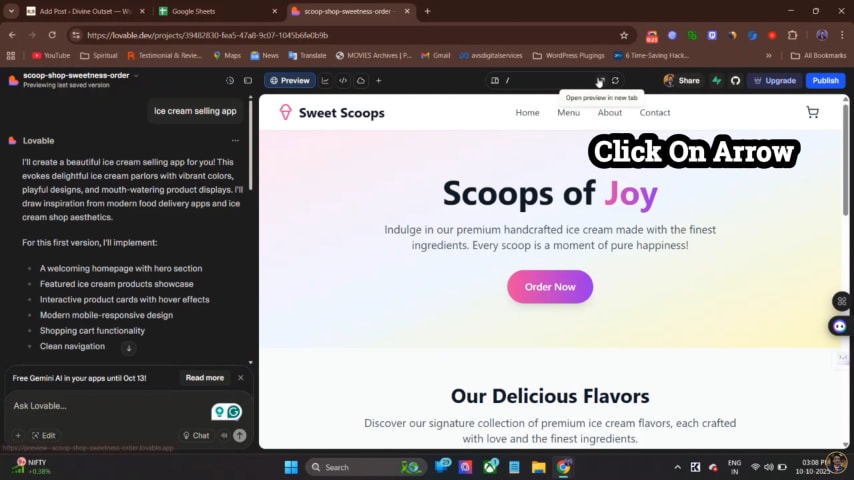
Step 1: Open Your Existing Project
Start by launching a prior Lovable project that you’ve already created.
Press the arrow icon (expand button) to launch it in the big screen!

Step 2: Copy Project URL
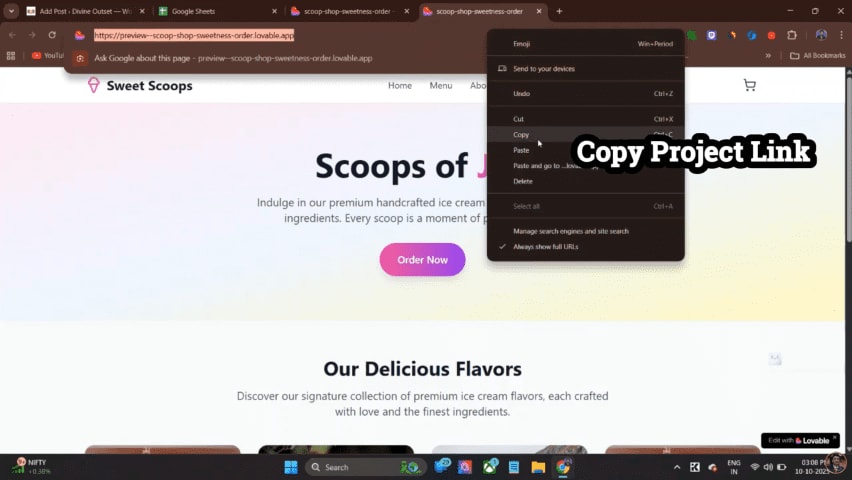
At the top, you should see your project URL.
Right-clicking your URL and copy the link- the link you copied will be used to transfer your project to another account.
Step 3: Open a Additional Lovable Account
Now, open a separate Lovable.dev account with a new email ID.
You may create up to 4 new accounts a day (each account will give you 5 new remix credits).
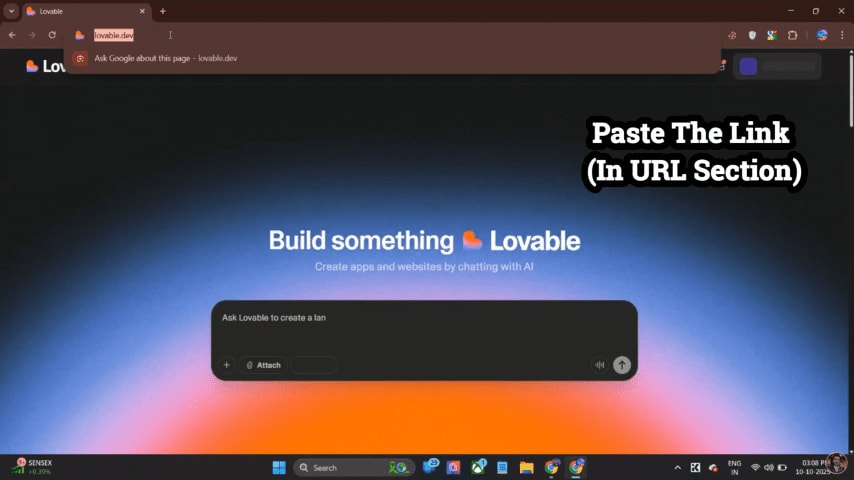
After you’ve logged into your alternative account, simply paste the copied link in the browser you are on and launch it.
Your old project should open exactly how it appeared in your previous account!

Step 4: Click on “Edit with Lovable”
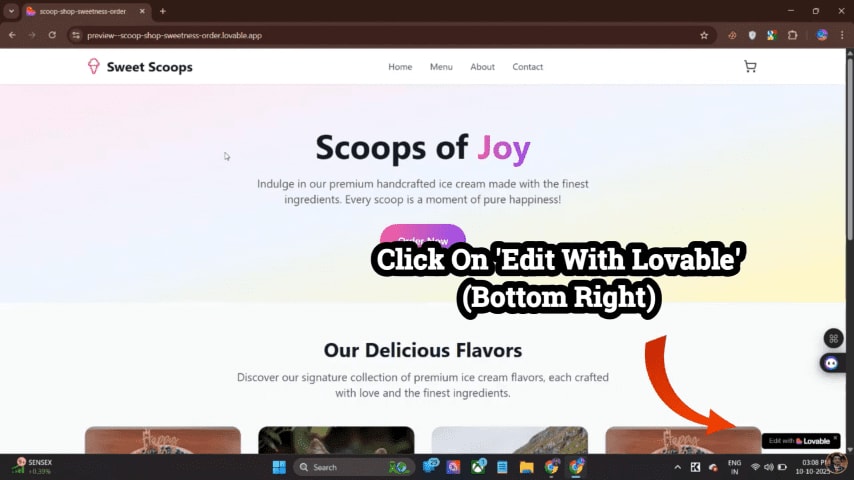
Once your project opens, on the bottom-right side of the screen, you should see a small icon that states “Edit with Lovable.”
Click on it, and that allows you to edit this project on the new account.
Step 5: Remix the Project
Now, you should see the new button that is called “Remix”(in the top-right corner).
Clicking “Remix” takes a duplicate of the project for you in your new account.
Congratulations! 🎉 You successfully completed moving your project to another account and received 5 more!

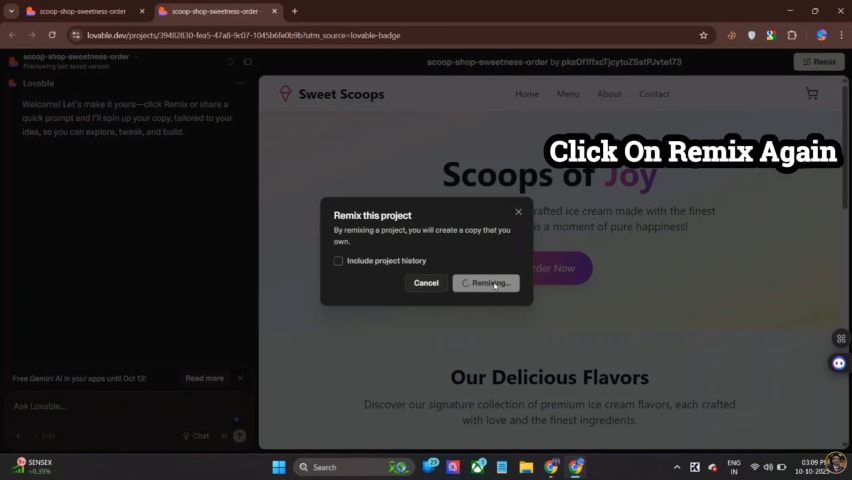
Step 6: Transfer Updates Back to the Main Account (Optional)
If you want to bring your updated project file back to your original account:
Simply grab the link again from your new account.
Then open your original Lovable.dev account.
Then paste the link and remix it again.
This allows you to keep all your edits in sync between accounts with the same safe trick.
⚠️ Important Warnings: Avoid Crashes
Do not connect to Supabase or any database until after the remixing.
- The remixing WILL NOT work after Supabase is connected.
- Connect databases only after the editing.
You can use this trick 4 times a day using different accounts.
If you try to do it 5 times or more, your project might crash with an error message or get temporarily blocked.
So take your safety seriously — four times only!
💡 Bonus Tip
If you want an extra 10 credits, then in the description of the video on my youtube channel, there is a sign-up link. You can create a new Lovable.dev account FOR free from that link and publish any project.
I get 10 credits too 😄
Watch the complete tutorial
For a full visual tutorial, simply view my video: “Unlimited Lovable Credits Trick | Lovable.dev Free Credits | 100% Verified 🔥” on my YouTube Channel – Akash Eternals.
Other Methods
1. Sign-Up Bonus: When you sign up for a new Lovable.dev account, you’ll get some initial credits for free.
2. Referral Program: You can send invites to friends with your referral link. Each referral will add bonus credits to your account.
3. Community Rewards: Join in the fun on the Lovable discord or forum. From time to time, Lovable will give away free credit for active contributors.
4. Special Events: There might be a limited time promotion where the Lovable team will drop codes for exclusive use.
The Unlimited Credit Trick Explained Step-By-Step
- Utilize Different Projects Strategically: Rather than remixing the same project over and over, create several mini-projects that link together, which will use credits much more efficiently.
- Duplicate Templates Instead of Remixing: Instead of just hitting remix multiple times, download the template and re-upload it.
- Use the Least Number of App Logic: The fewer unnecessary AI calls you make in your project, the fewer credits you will use.
- Join Beta Features: Early users will sometimes receive bonus credits for helping us test out new tools.
This won’t get you literally unlimited credits, but it will greatly enhance the ones you can use, potentially indefinitely.
Real Projects You Can Build In Lovable
- AI Resume Builder: Create an application that produces job-ready resumes.
- Startup Pitch Assistant: Create startup decks and investor summary documents.
- Personal AI Trainer: Use your notes to teach the AI to teach certain subjects.
- Social Media Content Generator: Automate content for brands and influencers.
- Client Onboarding Assistant: Offer FAQs, payments, and contracts all from one place.
Final Warning: Avoid Getting Blocked
⚠️ Alert — Lovable.dev only allows you to remix a project four times.
After the fourth time you remix, you risk a temporary cessation or blocking of services to your account.
You should make an external copy of your progress each time, or duplicate the project before remixing for a fifth time.
You can think of each remix as a “credit checkpoint,” and after four credits, you’ve hit the wall.
So strategize and work accordingly, and you should be fine.
